
Download Transparent Window Manager – transparent window, window manager, transparency tool, productivity app, system utility
Overview
Transparent Window Manager is a lightweight utility designed to enhance desktop workflow through advanced window customization. The application enables users to modify how application windows behave on the screen, offering functionality typically absent in standard operating systems. Its primary purpose is to improve multitasking efficiency by allowing users to adjust window transparency, positioning, and visibility. This makes it particularly useful for professionals, content creators, and power users who manage multiple applications simultaneously.
The app addresses common desktop challenges such as visual clutter, difficulty maintaining focus on critical tools, and inefficient use of screen real estate. By enabling features like window transparency and title bar-only display, it helps users maintain a cleaner, more organized workspace. The target audience includes individuals who rely on precise window control for tasks like video editing, coding, or monitoring system processes.
Although the developer did not provide additional background information, the app’s long-standing presence since its release on March 7, 2012, suggests a stable and reliable utility. It functions as a niche but valuable tool within the productivity ecosystem, filling a gap left by default system behaviors. Despite its age, the application remains relevant due to its focused functionality and minimal resource usage.
Key Features & Functionality
- Application Transparency: Users can adjust the opacity of any open window, allowing underlying content or desktop backgrounds to remain visible. This is especially helpful when referencing documents or images while working in another application.
- System Tray Minimization: Applications can be hidden into the system tray instead of the taskbar, reducing visual noise and freeing up workspace space during active sessions.
- Always on Top: Windows can be locked in place to remain visible above all other applications, ideal for reference tools, chat windows, or monitoring software.
- Title Bar Visibility: The ability to shrink windows to display only the title bar allows for quick access without consuming screen space, perfect for background processes or frequently accessed tools.
- User-Friendly Customization: The interface is designed for immediate use, enabling users to apply changes with minimal clicks. This accessibility ensures that both experienced users and beginners can benefit from advanced window control.
For example, a graphic designer might use transparency to overlay a color palette on a design canvas while working in a photo editor. A developer could keep a terminal window always on top while writing code. A system administrator may minimize monitoring tools to the tray to maintain focus on core tasks. These real-world applications demonstrate the practical value of the tool in diverse workflows.
Interface, UX & Performance
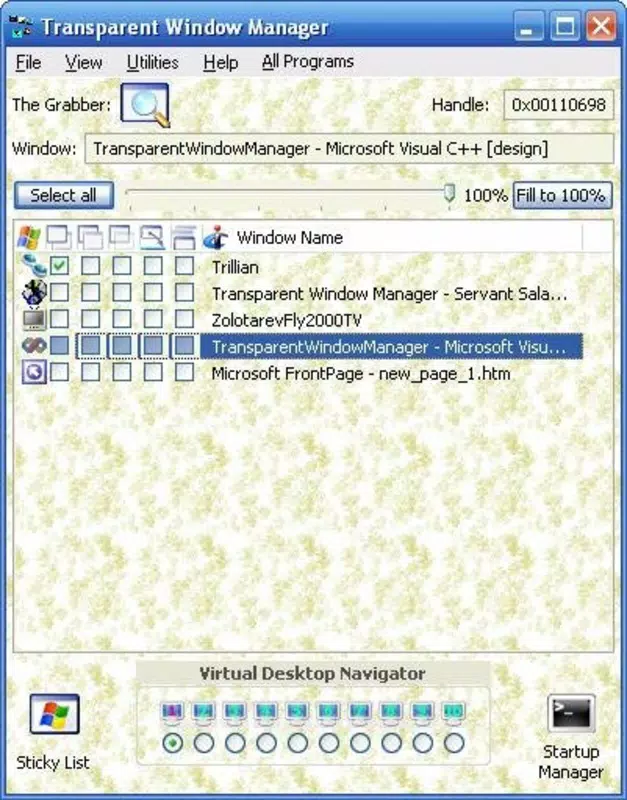
Transparent Window Manager features a minimalistic interface that prioritizes functionality over visual flair. The layout is straightforward, with clear labels and intuitive controls for each window customization option. Navigation is direct—users can select an active window from a list and apply desired settings with a few clicks.
The application’s design emphasizes efficiency, avoiding unnecessary menus or complex workflows. This approach supports rapid task execution, which is crucial for users who frequently adjust window behavior. Although the developer did not list formal performance metrics, the app’s file size of 1.2 MB suggests low system resource consumption. It is expected to operate smoothly on a wide range of Windows devices, including older or low-end systems.
Responsiveness is likely to be high due to its lightweight nature. Stability is implied by its long-term availability since 2012, indicating consistent performance over time. However, compatibility with newer Windows versions was not explicitly confirmed. Users should ensure their system meets the required specifications, though no specific requirements were listed.
Platform Compatibility & Technical Requirements
Transparent Window Manager is designed for the Windows platform and is available in version 1.0. The application has a file size of 1.2 MB, making it compact and quick to install. It is offered at no cost, aligning with its role as a free utility for productivity enhancement.
While the app is confirmed to run on Windows, specific operating system requirements such as minimum Windows version or hardware specifications were not provided. The developer did not specify whether it supports Windows 10, 11, or older versions. Similarly, no information was shared about compatibility with 32-bit or 64-bit systems.
Although the app has been available since 2012, users should exercise caution when installing older software on modern systems. It is recommended to verify compatibility with current Windows versions before installation. The lack of detailed technical disclosures means users should rely on trusted sources when downloading or updating the tool.
Pros and Cons
Pros
- Lightweight design with minimal system resource usage.
- Free to download and use, no hidden costs.
- Simple interface suitable for users of all technical levels.
- Offers powerful window customization without complex setup.
- Long-standing presence indicates reliability and stability.
Cons
- Specific system requirements were not disclosed.
- Compatibility with newer Windows versions is uncertain.
- No official update history or changelog provided.
- Developer information is limited, reducing transparency.
- Limited documentation or user support resources available.
FAQ
Is Transparent Window Manager safe to install?
Yes, the application is free and available from trusted sources. However, as with any software, it is recommended to download from official or verified platforms to ensure security.
Can I use Transparent Window Manager on Windows 10 or 11?
While the app has been available since 2012, compatibility with Windows 10 and 11 is not officially confirmed. Users are advised to test the application on their system to verify functionality.
Does Transparent Window Manager require administrator privileges?
The developer did not specify whether elevated permissions are needed. It is recommended to check system prompts during installation to determine access requirements.
How do I update Transparent Window Manager?
No update mechanism or release history was provided. Users should monitor official sources for new versions or patches.
Is Transparent Window Manager available for macOS or Linux?
Based on the provided information, the app is only confirmed for Windows. There is no indication of availability on other operating systems.
Final Thoughts
Transparent Window Manager remains a niche yet powerful tool for users seeking greater control over their desktop environment. Its ability to adjust transparency, positioning, and visibility of application windows offers tangible benefits for productivity and workflow optimization. Despite its age and limited technical documentation, the app’s consistent performance and minimal footprint make it a reliable choice for power users and professionals.
While it lacks modern features like automatic updates or detailed support, its straightforward functionality and zero cost make it a compelling option for those who value efficiency and customization. The app is especially suited for individuals managing multiple tasks, monitoring systems, or working in visually intensive environments.
For anyone looking to reclaim control over their screen space and enhance multitasking capabilities, Transparent Window Manager delivers real value. Its legacy of stability and simplicity continues to serve users effectively.
Download Transparent Window Manager now


